
Problems with tracking inventory levels
- Do you run a warehouse and struggle to keep control over stock levels because of how dynamic your company is?
- Do the products you need disappear, and you have no idea where or when?
- Does ordering products look like this: something suddenly runs out, so you have to rush to bring it in just to keep production running?
The solution
Let's say you're a furniture manufacturer. You stock furniture boards (from which products - i.e. furniture - are made) as well as finished products (furniture). You need to make sure that:
- Your stock of furniture boards (and other production inputs) allows for continuous production
- Your stock of products (e.g. cabinets) covers demand (unless it's made-to-order)
Automating orders with Odoo
If you use Odoo, the solution is straightforward. Set reordering rules for a product by going from the product page to "Reordering Rules", using the quick-action button (highlighted in red). Create a new rule, and set Min and Max.
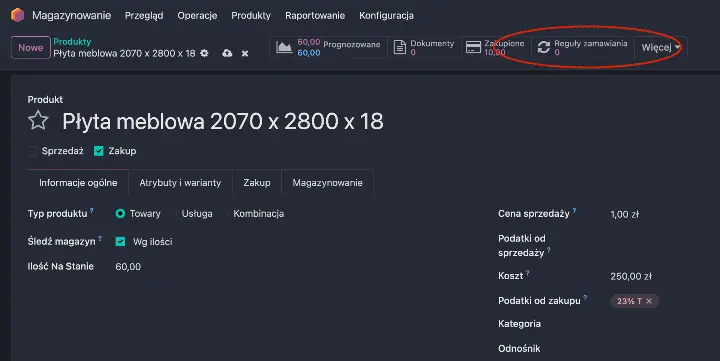
Reordering rules can be set by going to "Reordering Rules".

Definition of reordering rules.
Thanks to this, the system will monitor stock levels on its own and take the necessary action. When the system detects that stock has fallen below the minimum, it will create an order. What does this mean in practice?
No more firefighting. You don't have to worry about inventory levels - the system proactively makes sure the stock needed to keep production running is on hand.
Advanced configuration
This is just one of the available configuration options. Odoo allows for more advanced production logic setups - such as Just-In-Time or Make-to-Order.
Setting up stock rules is just one part of a bigger picture. If you'd like a systematic analysis and optimization of your entire material flow - from raw material ordering to shipping the finished product - book a 20-minute Needs Analysis.