

Another module created under the Adapt IT brand has been added to the official Odoo App Store: Przelewy24 Payments.
This module provides integration with the Przelewy24 payment gateway, enabling you to accept online payments, including BLIK and fast bank transfers. All the options offered by the Przelewy24 payment provider are available.

Key features of the Odoo Przelewy24 payment module
The module, built by Adapt IT, integrates with Odoo eCommerce and other Odoo functionalities. What do you gain by purchasing the module? Here's the list:
- Accepting BLIK payments, fast bank transfers, card payments, Apple Pay, and Google Pay
- Automatic payment processing, status updates for paid orders and invoices, with a full history view in Odoo
- Integration with Przelewy24, meaning lower fees compared to the payment gateways available in Odoo (e.g. Stripe, Adyen)
- The ability to issue customer refunds directly from Odoo, plus a full refund history
- Two language versions - Polish and English
- You can test the integration thanks to a test mode that runs operations on the sandbox (Przelewy24's test server)
Watch the one-minute video demonstrating the module:
Configuration - how to set up the Przelewy24 payment module in Odoo
Setup comes down to a few steps:
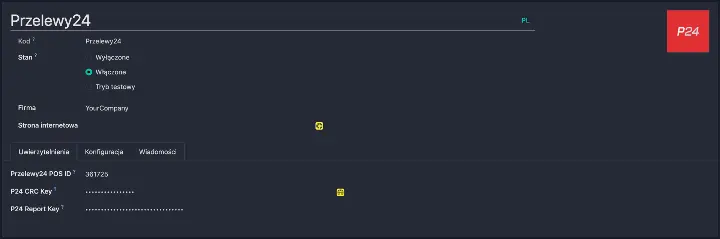
- After installing the module, select Przelewy24 in the payment providers settings.
- In the "Credentials" tab, paste the data from your Przelewy24 panel: POS ID, CRC key, and report key.
- Once saved and activated, the payment method becomes available to customers.
Przelewy24 payment module - how to get it?
The module is available for purchase in the official Odoo App Store. If you have any questions about the setup, feel free to get in touch.