

This article focuses on sharing technical knowledge about QWeb template view inheritance. If you're not sure what these views are, where to find them, or what they're for, check out the article on editing a page template with QWeb.
In this article I'll focus on showing the code. This code changes the look of the product page. The goal was to shrink the image and place it in the same row as the title. I sell services, not products. The preview image was taking up too much space on the screen. Here's what the page looks like before and after connecting the extending template:
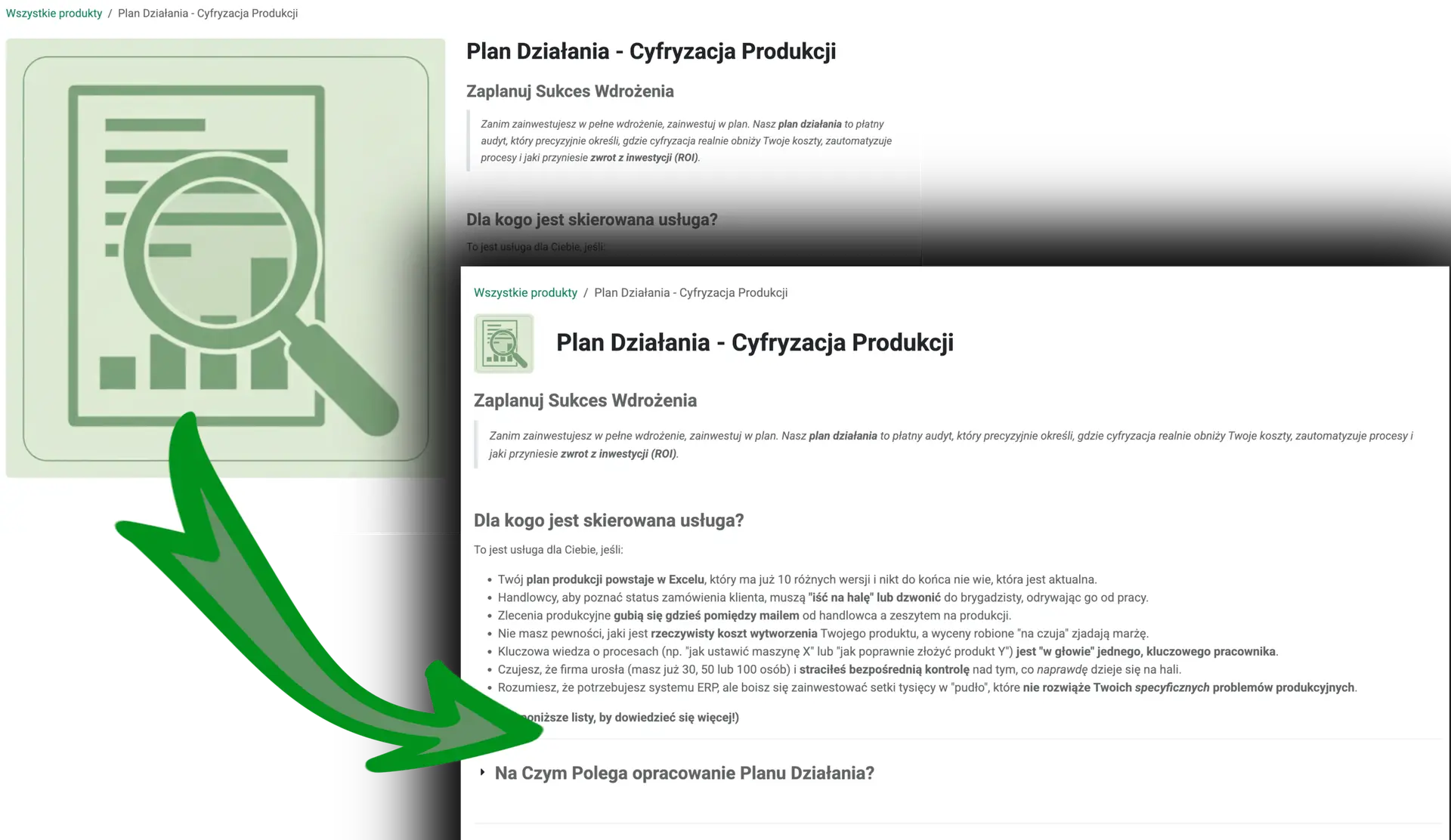
Image 1. Odoo product page before (large image) and after (small image in the same row as the title) adding the template.
QWeb template code
The visual changes above were achieved by adding two inheriting views. Below you'll find the template code.
View inheriting from website_sale.product
<data inherit_id="website_sale.product" active="True" name="Small image and title in top row" key="product_page_layout_small.x_custom_small_image_title_top">
    <xpath expr="//h1" position="before">
        <div class="row align-items-center mt-3">
        </div>
    </xpath>

    <xpath expr="//div[@id='product_details']/div[1]/div[1]/div[1]" position="inside">
        <xpath expr="//div[@id='product_detail_main']/div[1]" position="move"/>
    </xpath>

    <xpath expr="//div[@id='product_detail_main']/div" position="attributes">
        <attribute name="t-attf-class"/>
    </xpath>

    <xpath expr="//div[@id='product_details']/div[1]/div[1]/div[1]/div[1]" position="attributes">
        <attribute name="t-attf-class">col-lg-1 o_wsale_product_images position-relative</attribute>
    </xpath>

    <xpath expr="//div[@id='product_details']/div[1]/div[1]/div[1]" position="inside">
        <xpath expr="//h1" position="move"/>
    </xpath>

    <xpath expr="//h1" position="replace">
        <div class="col-lg-11">$0</div>
    </xpath>
</data>
<data inherit_id="website_sale.product" active="True" name="Small image and title in top row" key="product_page_layout_small.x_custom_small_image_title_top">
    <xpath expr="//h1" position="before">
        <div class="row align-items-center mt-3">
        </div>
    </xpath>

    <xpath expr="//div[@id='product_details']/div[1]/div[1]/div[1]" position="inside">
        <xpath expr="//div[@id='product_detail_main']/div[1]" position="move"/>
    </xpath>

    <xpath expr="//div[@id='product_detail_main']/div" position="attributes">
        <attribute name="t-attf-class"/>
    </xpath>

    <xpath expr="//div[@id='product_details']/div[1]/div[1]/div[1]/div[1]" position="attributes">
        <attribute name="t-attf-class">col-lg-1 o_wsale_product_images position-relative</attribute>
    </xpath>

    <xpath expr="//div[@id='product_details']/div[1]/div[1]/div[1]" position="inside">
        <xpath expr="//h1" position="move"/>
    </xpath>

    <xpath expr="//h1" position="replace">
        <div class="col-lg-11">$0</div>
    </xpath>
</data>
View inheriting from website_sale.shop_product_carousel:
<data inherit_id="website_sale.shop_product_carousel" active="True" name="Small image title carousel adjustment">
    <xpath expr="//div[@id='o-carousel-product']" position="attributes">
        <attribute name="t-attf-class" remove="mb-3" separator=" "/>
    </xpath>
</data>
<data inherit_id="website_sale.shop_product_carousel" active="True" name="Small image title carousel adjustment">
    <xpath expr="//div[@id='o-carousel-product']" position="attributes">
        <attribute name="t-attf-class" remove="mb-3" separator=" "/>
    </xpath>
</data>
Template code walkthrough
The first line is the data definition. It contains information about which view our view inherits from, plus a few other parameters. inherit_id - the id of the model our view inherits from. active - specifies whether the view is active. Name - the name of the model.
Lines 2-5
I look up the h1 element with an xpath expression. Important: if there were two h1 elements, the first one would be returned.
I add a <div> element before the h1 element (position="before").
Lines 7-9
I move (position="move") the element //div[@id='product_detail_main']/div[1] into the element //div[@id='product_details']/div[1]/div[1]/div[1] (position="inside").
Lines 11-13
I remove the t-attf-class attribute from the element //div[@id='product_detail_main']/div. Important: I tried removing class here, but at the moment the template is inherited, class doesn't exist yet. t-attf- is a dynamic QWeb attribute that Odoo renders. class is generated based on that attribute.
Lines 15-17
I overwrite the class attributes of the element //div[@id='product_details']/div[1]/div[1]/div[1]/div[1] as col-lg-1 o_wsale_product_images position-relative.
Lines 19-21
I move an element again, this time h1.
Lines 23-25
I wrap the h1 element in <div class="col-lg-11">$0</div>. Important: I use position="replace", which replaces the element matched by xpath with another one, taken from an inner node. The symbol $0 in Odoo QWeb represents the original content of the element being overwritten.
Snippet 2, Lines 2-4
I remove the mb-3 class from the element //div[@id='o-carousel-product'].
Summary
Inherited templates are used to manipulate the structure of the parent template. We can use:
position="inside"- to add an element inside the node matched by the xpath expressionposition="after"- to add an element after the node matched by the xpath expressionposition="before"- to add an element before the node matched by the xpath expressionposition="replace"- to swap the element matched by xpath for the one given in the specification (the symbol $0 gets replaced with the original content of the node being replaced)position="attributes"- to manipulate attributes (e.g. addingcol-lg-6toclass)position="move"- to move an entire node